.png)
 2 years ago
🎙️ Daily Podcast (FR) : NViNiO•Podcast™
ADs | ✨ Enhance your Social Media content with NViNiO•AI™ for FREE
Sep 10, 2024
[[read-time]] min read
Browse more easily across your devices whether you’re at home or out and about.
Kayce Hawkins
Product Manager, Chrome
General summary
Chrome users, get ready for three new updates to enhance your tab management experience! Tab groups, previously available on desktops and Android, are now coming to iOS devices, allowing you to organize related tabs and easily identify them with custom names and colors. Excitingly, tab groups will soon be synced across all your devices, so you can seamlessly continue your browsing sessions from one device to another. Lastly, Chrome will suggest pages to revisit based on your browsing history on other devices, making it easier to pick up where you left off. Stay tuned for these upcoming improvements to Chrome on your phone, tablet, and computer!
Summaries were generated by Google AI. Generative AI is experimental.
Bullet points
Chrome updates make it easier to manage tabs on phones, tablets, and computers. Tab groups, already available on desktop and Android, are coming to Chrome on iOS. Save and sync tab groups across all your devices to pick up where you left off. Chrome will suggest pages to revisit based on tabs you opened on other devices. These new features help you stay organized and easily access your favorite websites.Summaries were generated by Google AI. Generative AI is experimental.
Basic explainer
Chrome is getting 3 new updates to help you manage your tabs better:
Group tabs together and name them on your iPhone or iPad. Save and sync your tab groups across all your devices. Chrome will suggest pages you were looking at on other devices.Summaries were generated by Google AI. Generative AI is experimental.
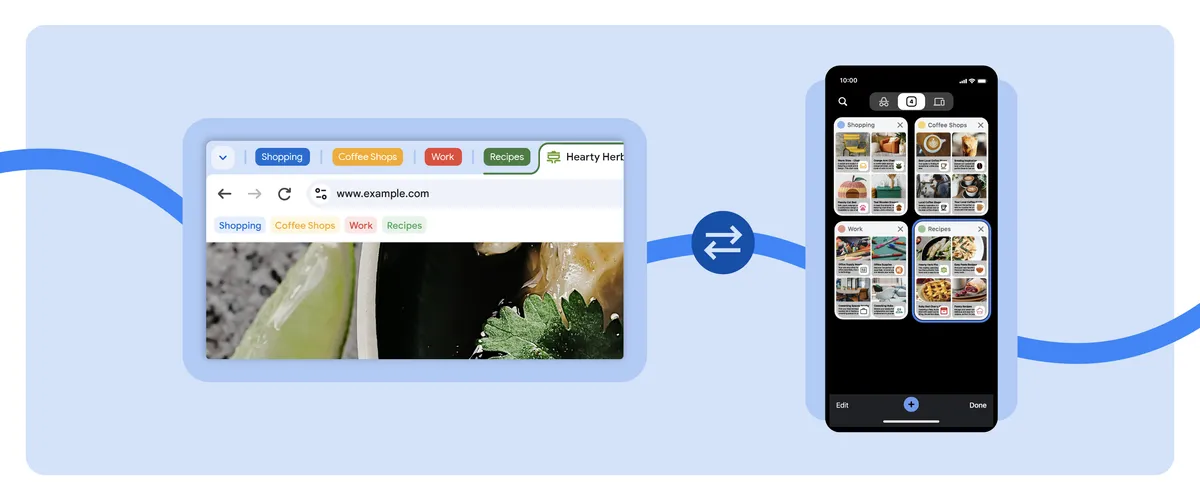
It can be frustrating to dig through multiple open tabs to find what you need. Over the past year, we've helped make it easier to manage tabs and get things done, from grouping together similar tabs to comparing items, all powered by Google AI.
Three more improvements are coming soon to Chrome to make it easier to access and organize your tabs, whether you're on your phone, tablet or computer.
1. Try out tab groups on iOS
Already available on desktop and Android devices, tab groups are coming to Chrome on iOS. From your iPhone or iPad, you’ll be able to group related tabs together and give them a custom name and color for quick identification. To start, simply open the tab grid, long-press a tab and select "Add Tab to New Group." Once the tabs are grouped together, you can rearrange them any way you like.
2. Use tab groups across your devices
Coming soon to Chrome, you can save and sync your tab groups, so they are automatically available across all your desktop and mobile devices. You’ll be able to start a project in one place and pick it up in a different one, without losing your work.
For example, imagine you’re casually looking up restaurants and activities on your phone as you start to plan out your itinerary for an upcoming trip. You realize you need a bigger screen to dig through all of your research, so you create a tab group to keep everything organized. The tab group will automatically sync to your desktop, so you can easily resume your trip planning journey when you open Chrome on your computer.
3. Pick up where you left off with some help from Chrome
Chrome is experimenting with suggesting pages to revisit based on tabs you opened up on your other devices. This can be especially helpful when you’re, say, browsing a website while at the office and need to get back to it on the commute home. There’s no need to bookmark the page or remember the exact URL — Chrome will proactively suggest pages to revisit on the Chrome New Tab page on Android, iOS and desktop.
With these new tab features in Chrome, we’re making it easier for you to keep track of tasks and conveniently revisit your favorite websites, all while switching between your devices at home or on the go.

Let’s stay in touch. Get the latest news from Google in your inbox.







 English (United States) ·
  French (France) ·