.png)
 2 months ago
Alex Tsu
Product Manager, Chrome
Jess Carpenter
Product Manager, Chrome
General summary
Chrome has two new features to help you focus and be more productive. You can now move your tabs to the side of your browser window by right-clicking and selecting “Show Tabs Vertically.” Also, you can remove distractions from any webpage by right-clicking and selecting “Open in reading mode.”
Summaries were generated by Google AI. Generative AI is experimental.
Basic explainer
Chrome has new features to help you focus. Vertical tabs let you see all your tabs on the side. Reading mode makes web pages simpler so it's easier to read.
Summaries were generated by Google AI. Generative AI is experimental.
Your browser does not support the audio element.
Listen to article
This content is generated by Google AI. Generative AI is experimental
[[duration]] minutes
Today we are beginning to roll out two new features designed to streamline your browser and help you maximize productivity in Chrome.
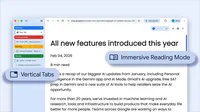
You now have the option to use vertical tabs in Chrome, depending on your preferences. Just right click on any Chrome window and select “Show Tabs Vertically.” By moving your tabs to the side of your browser window, you can read full page titles and manage tab groups with ease — even when your tab count hits double digits. This layout is perfect for multitasking, saving you time by making sure you never lose a tab.
And reading mode, a favorite Chrome feature for deep focus, is even better with a new full-page interface. Right-click on any page and select “Open in reading mode” to remove visual distractions and transform a busy webpage into an immersive, text-focused reading experience.
Try both features to see how a little extra focus can make a big difference.

Let’s stay in touch. Get the latest news from Google in your inbox.









 English (United States) ·
  French (France) ·