.png)
 2 years ago
🎙️ Daily Podcast (FR) : NViNiO•Podcast™
ADs | ✨ Enhance your Social Media content with NViNiO•AI™ for FREE
Aug 01, 2024
[[read-time]] min read
The feature School time is coming to more Android devices, and we’re continuing to provide tailored supervision experiences for teens.

Mindy Brooks
General Manager, Kids and Families
Bullet points
Parents want more control over their children's screen time, especially during school hours. New School time feature for Android phones and other devices lets parents set a dedicated home screen with limited functionality during school hours. Parents can schedule and select which apps are allowed during School time in Family Link, our parental controls app. School time can also be turned on outside of class when it may be time to focus or take a break from screens. New supervision features for parents of teens are coming to YouTube, including the ability to link accounts and gain visibility into their teens' activity.Summaries were generated by Google AI. Generative AI is experimental.
Basic explainer
Parents want to help their kids use technology wisely, and every family has different needs.
A new setting called School time lets parents limit what their kids can do on their devices during school hours.
Parents can choose which apps are allowed and can also allow calls or texts from specific contacts.
As kids get older, parents can use different supervision options to reflect their teens' understanding and use of technology.
Summaries were generated by Google AI. Generative AI is experimental.
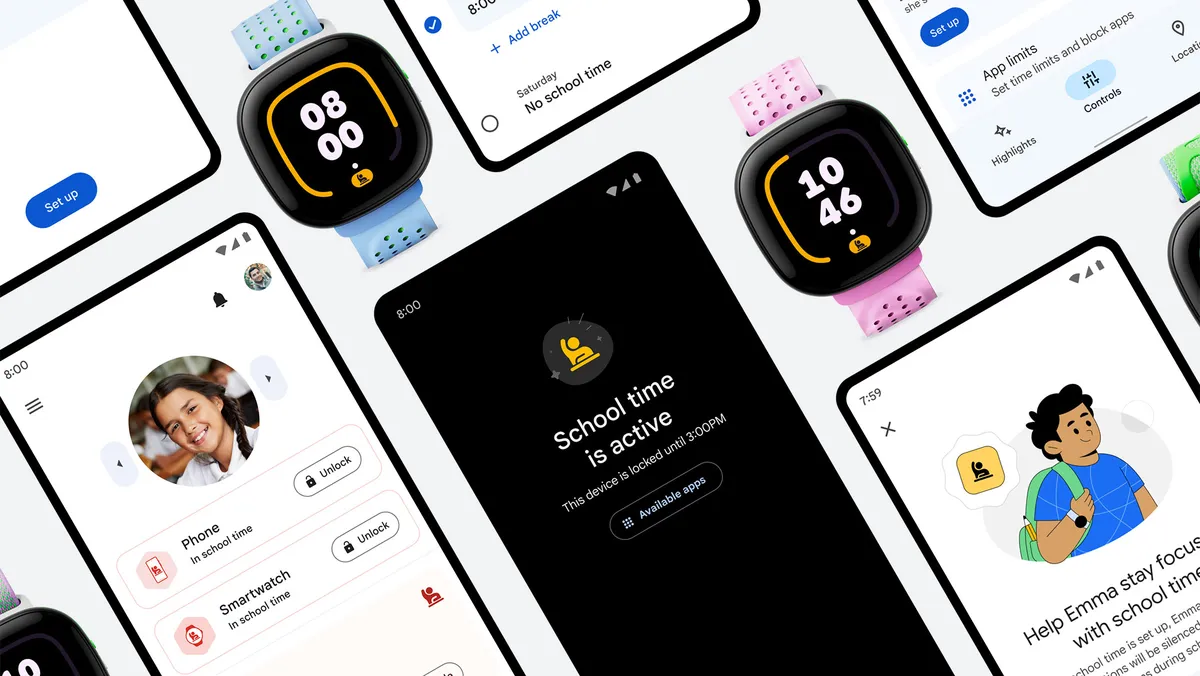
Parents think deeply about how their children should use technology, including how to strike the right balance for time spent on and offline. Every family has different needs and perspectives on this topic, which is why we’ve focused on developing tools to help each family set their own ground rules.
Today, we’re announcing a new setting for Android phones and other devices that empowers parents to use a School time feature.
Helping students focus on learning during school hours
We regularly engage with parents when designing products, and often hear from parents who do not want their children distracted at school but still want to be able to get in touch in case of emergency.
That’s why this year we introduced School time on Fitbit Ace LTE smartwatches. Over the next year, we’ll bring School time to even more devices including select Android phones, tablets and Samsung Galaxy Watches to promote a productive learning environment.
School time enables parents to set their child’s personal device to a dedicated home screen with limited functionality during school hours, which helps reduce distractions during class. Parents can schedule and select which apps are allowed during School time in Family Link, our parental controls app. Parents will also have the option to allow calls or texts from specific contacts.
School time can also be turned on outside of class when it may be time to focus or take a break from screens. For teens who are not supervised by a parent through Family Link, we also offer Focus mode on Android devices to prevent notifications and limit distractions during a specific time period.
Additional settings for teens and teen supervision
As children grow into teens, parents may want different supervision options to better reflect their teens’ understanding and use of technology. We recognize that the settings a family wants to use can differ by age, developmental stage and parenting style. Which is why we’re continuing to provide tailored settings and experiences:
New supervision features for parents of teens are coming to YouTube. In an update rolling out later this summer, parents and teens will be able to link their accounts, enabling parents to gain visibility into their teens’ activity on YouTube.In Family Link, supervision can be enabled for all ages. This helps give parents flexibility to determine the apps, products and experiences their teens can use, while also continuing to monitor their activity and set digital ground rules such as screen time limits or location sharing.For all users under 18, we have default safety settings in place. This includes turning SafeSearch on, implementing content restrictions and turning autoplay off on YouTube. We also recently introduced new safeguards that limit recommendations of videos with content that could be problematic, especially for teens, if viewed in repetition – such as content related to body image.Ongoing investment in parental controls
We are continuously investing in research and development to address the evolving needs of parents and children. By working closely with experts in child development, education and technology, our goal is to help shape a future where technology continues to facilitate learning and exploration.






 English (United States) ·
  French (France) ·