.png)
 1 year ago
🎙️ Daily Podcast (FR) : NViNiO•Podcast™
ADs | ✨ Enhance your Social Media content with NViNiO•AI™ for FREE
Feb 12, 2025
[[read-time]] min read
To help families foster healthy digital habits, Family Link is introducing an easier-to-navigate design and School time and parent-managed contacts for Android.

Wendi Rieb
Product Manager, Google Family Link
General summary
Google Family Link is getting new tools to help parents manage their kids' devices. The app has a new design with a dedicated Screen Time tab for managing screen time limits and Downtime. Parents can also easily manage their child's account, privacy settings, and content filters on the Controls tab. You can learn more about these new features and how Google is helping families explore online safely at families.google.
Summaries were generated by Google AI. Generative AI is experimental.
Bullet points
Google Family Link gives parents new tools to manage their kids' online activity. Family Link's new design makes it easier to manage screen time, privacy settings, and content filters. School time, previously available on smartwatches, is coming to Android phones and tablets. Parents can now approve contacts for their kids to call and text on Android phones. These new features help parents keep their kids safe online and foster healthy digital habits.Summaries were generated by Google AI. Generative AI is experimental.
Basic explainer
Google Family Link is getting an update to help parents keep their kids safe online. The app is easier to use and has new tools to manage screen time, like setting limits and blocking certain apps. Parents can also choose which contacts their kids can call and text. The update also lets parents set "School Time" on Android phones and tablets, which limits distractions during school hours.
Summaries were generated by Google AI. Generative AI is experimental.
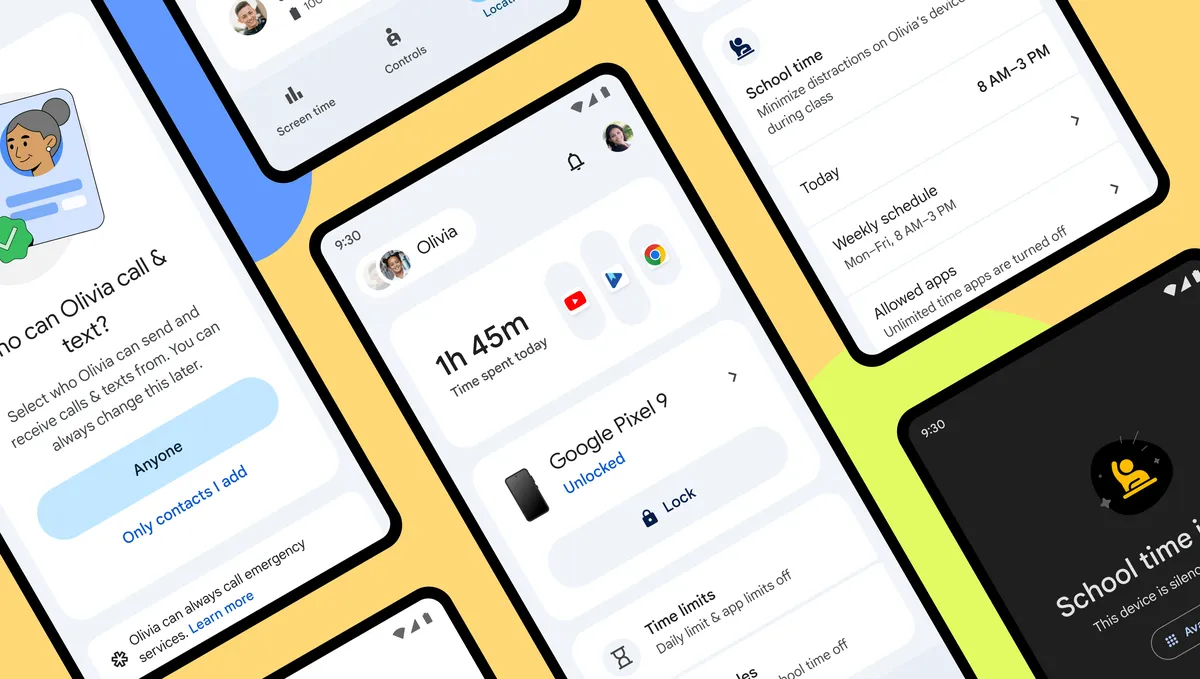
Keeping kids safer online and fostering healthy digital habits is important for parents, and finding the right balance is key. Today, we’re announcing new tools for parents to manage their child’s devices with Google Family Link1.
Family Link’s new look
Family Link’s new design is more intuitive for parents to use and navigate. A new Screen Time tab consolidates all screen-time management tools in a single, easily accessible place. In addition to the app and device-specific usage summary and time limits, the Screen Time tab also makes it easier for parents to set and adjust Downtime and School time.
Parents will find that managing their child’s account, privacy settings and content filters are now easier than ever on the Controls tab. We've streamlined key controls so parents have what they need right at their fingertips, including the ability to manage account data settings, approve app downloads and block specific websites.
Juggling multiple kids and their devices is also getting easier. Simply swipe between child profiles and manage devices from a single page, with more advanced settings just a tap away.
School time on Android
We introduced School time2 on the Fitbit ACE LTE and Samsung Galaxy Watch for Kids as a way to help minimize distractions on smartwatches for children during school hours. Starting next week, we’ll roll out School time support for Android phones and tablets as well.
School time can help reduce distractions, by scheduling limited phone functionality and silenced notifications during school hours. If there is a vacation or planned day off, or even just planned lunches and recess, parents can easily adjust the settings and set a “Break” to fit their children’s schedules.
Parents can choose the apps that are silenced and restricted, and learn which apps their child uses while in School time or outside of it. We understand there are times when certain apps are useful for studying, which is why parents can choose a set of allowed apps, and select which are allowed during School time or in other selected modes.
Parent-managed contacts
Galaxy Watch for Kids launched with lots of new features for kids and parents. In the coming months, we're bringing the ability for parents to approve contacts3 for kids to call and text to Android phones, too. Parents can add these contacts from Family Link directly to their child’s device and limit calls and texts to only those approved contacts. Children can also request to add new contacts to be approved by parents in Family Link.
To learn more about how we’re helping families more safely explore online, visit families.google.

Let’s stay in touch. Get the latest news from Google in your inbox.









 English (United States) ·
  French (France) ·