.png)
 2 years ago
🎙️ Daily Podcast (FR) : NViNiO•Podcast™
ADs | ✨ Enhance your Social Media content with NViNiO•AI™ for FREE
Aug 14, 2024
[[read-time]] min read
An updated UI, stackable effects, and more make connecting with friends and family more fun.
Jennifer Shen
Product Manager, Google Meet
Bullet points
Google Meet's new video calling experience includes a fresh look and more accessible features. Easily access advanced features like live captions and real-time chat during video calls. Express yourself with stacked effects, backgrounds, filters, and emoji reactions. Share your screen on both iOS and Android to show photos, videos, and presentations. Take calls on the go with on-the-go mode and transfer calls between devices seamlessly.Summaries were generated by Google AI. Generative AI is experimental.
Basic explainer
Google Meet is getting a new look and features.
You can now access advanced features more easily, use emoji reactions, and try on-the-go mode.
Share your screen, stack effects, and transfer calls between devices.
These updates will roll out over the next few months.
Summaries were generated by Google AI. Generative AI is experimental.
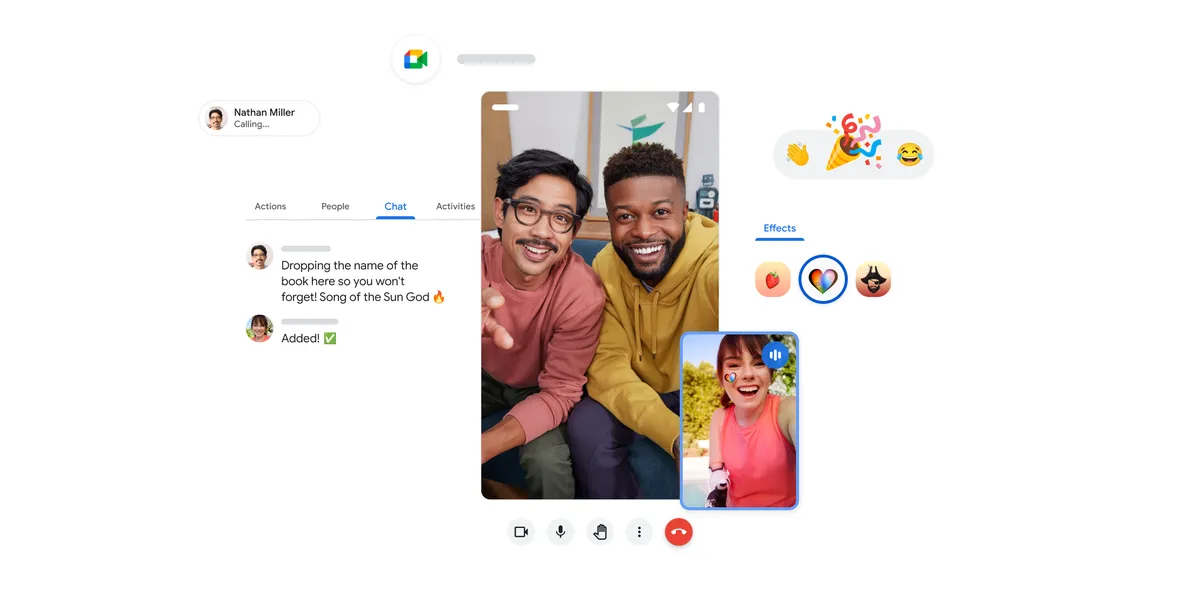
Today we’re starting to roll out an updated video calling experience in Google Meet that includes a new look and features to help you stay even more connected with anyone you’re chatting with — from friends and family to classmates and co-workers. With these updates, you can access advanced features more easily, use emoji reactions, and try on-the-go mode, all while enjoying a consistent experience across video calls and scheduled meetings in Meet.
Easily access advanced features
Meet’s calling interface has a fresh look and feel, making it even easier to start and receive video calls or schedule one for later. If you've used Meet for video meetings on your mobile device, you'll feel right at home with the new layout that includes call control buttons that mirror the meetings experience. You can also more easily access advanced features like live captions, which are available in over 70 languages. Plus, you can keep the conversation going with real-time chat directly in your video call that lets you share links and stay engaged even when you can't talk out loud.
Express yourself with stacked effects and emoji
With backgrounds, filters and effects, you can add some pizzazz to your video tile — whether it’s transporting yourself to a new location or spicing up your wardrobe. Now you can stack effects — like adding a filter, background and accessories — to help you look your best (or just have some fun).
You can now better express yourself on large group calls with emoji reactions. With a quick tap, show that you agree with an idea, celebrate a win or react to a joke — all without disrupting the conversation. You can send a thumbs up 👍, clapping hands👏, or laughing face 😂emoji and more, and can change the emoji skin tone in settings to best reflect you.

Share experiences
Video calls are about catching up or sharing a moment with others, even when you’re miles apart. Now, you can use screen sharing — on both iOS and Android — to show photos, videos, presentations and more to everyone in the call. Share memories of your recent vacation, collaborate on group projects or even give some tech support to your parents.
Take calls on the go
Meet video calls now support on-the-go mode on Android and iOS, an audio-only experience with larger, easier-to-press call control buttons. So you can take calls on your walk, in a car or on public transportation with fewer distractions.
And if you need to switch your call to your Android phone and tablet, no problem, the new call transfer feature lets you easily move your video call to another device without missing a beat.

These updates will gradually roll out to Google Meet video calls over the next few months. Be sure to keep your Meet app updated to access them as soon as they’re available. If anyone on your video call is not using the latest version of Meet, the call will default to the legacy calling experience. For more details, check out the Help Center.









 English (United States) ·
  French (France) ·