.png)
 2 months ago
Notebooks in Gemini help you organize your chats and projects in the Gemini app, with our AI-powered research partner, NotebookLM, for easier learning and working.
Rebecca Zapfel
Senior Product Manager
General summary
Gemini now offers notebooks to help you organize chats and files for complex projects. Notebooks sync across the Gemini app and NotebookLM, so you can access unique features in each app. Google AI Ultra, Pro, and Plus subscribers on the web will get access this week, with expanded access coming soon.
Summaries were generated by Google AI. Generative AI is experimental.
Bullet points
Gemini's new "notebooks" help you organize chats and files for complex projects. Notebooks are personal knowledge bases that sync across Gemini and NotebookLM. Organize chats, give custom instructions, and add files to give Gemini context. Notebooks let you use more sources, depending on your subscription plan. Google AI Ultra, Pro, and Plus subscribers get notebooks this week on the web.Summaries were generated by Google AI. Generative AI is experimental.
Your browser does not support the audio element.
Listen to article
This content is generated by Google AI. Generative AI is experimental
[[duration]] minutes
As you rely on the Gemini app for more complex projects, from studying for exams to diving into a new hobby, keeping track of everything can be a challenge. At the end of last year, we added NotebookLM as a source in the Gemini app to help. Now we’re taking that integration a step further by introducing notebooks.
Think of notebooks as personal knowledge bases shared across Google products, starting in Gemini.
They give you a dedicated space to organize your chats and files, and because they sync with NotebookLM, you can unlock even more efficient workflows directly from Gemini.
Stay organized in one easy space
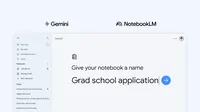
With notebooks, you can keep conversations about a topic organized in one place. Just click “New notebook” on the side panel of the Gemini app to get started. You can move past chats into notebooks, give Gemini custom instructions and add relevant files like documents and PDFs to give Gemini more context. Once your handpicked sources are organized into a notebook, Gemini uses them alongside its powerful tools and web search to provide uniquely helpful responses.
Sync notebooks across two powerful apps
Notebooks let you use more sources depending on your subscription plan, helping you tackle bigger tasks and longer-running projects. And since notebooks sync across the Gemini app and NotebookLM, any source you add in one place automatically appears in the other. This continuity means you can use unique features of each app, like Video Overviews and Infographics in NotebookLM, even if you started a notebook in the Gemini app. For example, if you’re a student, try adding class notes to a notebook and using NotebookLM to create a Cinematic Video Overview. The next day, open the Gemini app and ask it to draft an essay outline on that exact material.
We're rolling out notebooks in Gemini this week, starting with Google AI Ultra, Pro and Plus subscribers on the web. 1 In the coming weeks we'll expand access to mobile, more countries across Europe and to free users. This is a first step, and we’re working to bring even more helpful features to notebooks in Gemini in the future.








 English (United States) ·
  French (France) ·